

Description
Download Vilanoise TV – Online Music, Music Videos, Streaming
Overview
Vilanoise TV is a free desktop application designed to deliver uninterrupted access to a curated stream of international music videos in high definition. The software functions as a dedicated online music television platform, allowing users to explore and enjoy the latest hits and emerging artists without the need for registration or subscriptions. It is tailored for music enthusiasts, casual viewers, and anyone seeking a seamless way to discover new bands and enjoy visual content from top global performers.
The application operates as a standalone desktop tool, offering a simple interface to access a continuous stream of music videos. It is particularly suited for users who prefer a distraction-free viewing experience, whether for personal entertainment, background music during work, or sharing content with friends via social networks. The developer, Vilanoise, has positioned the platform as a no-frills, ad-free solution for music lovers who value convenience and accessibility.
While specific details about the developer’s background are not provided, the software’s focus on free, unlimited access and HD streaming suggests a commitment to user-friendly entertainment. The application supports multiple operating systems, making it accessible to a broad audience across Windows, Mac, and Linux environments. Its core purpose remains consistent: to deliver a continuous, high-quality music video experience without interruptions or technical barriers.
Key Features & Capabilities
- HD Music Video Streaming – Access to high-definition music videos from international artists, ensuring clear visuals and immersive audio for an enhanced viewing experience.
- Uninterrupted Playback – Continuous stream of music videos without ads, breaks, or mandatory pauses, ideal for background listening or extended viewing sessions.
- Free and Unlimited Access – No subscription, no registration, and no time limits. Users can enjoy content at any time, from any device supporting the software.
- Easy Social Sharing – Built-in functionality to share favorite music videos directly to social networks, enabling users to recommend new artists and trends to their communities.
- Fullscreen Viewing Mode – Fullscreen playback option for an immersive experience, perfect for watching music videos on larger screens or during events.
- Cross-Platform Availability – Compatible with Windows, Mac, and Linux, allowing users to use the application across different operating systems without compatibility issues.
These features collectively support a seamless music discovery journey. For example, a user can launch the application during a study session and enjoy a loop of popular music videos, enhancing focus and mood. Another scenario includes sharing a newly discovered band’s video with friends on Facebook or Instagram, helping to spread awareness of emerging talent. The absence of registration also reduces friction, making the platform ideal for spontaneous use.
User Interface, Workflow & Performance
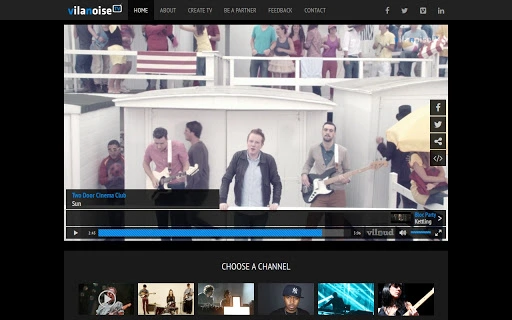
The user interface of Vilanoise TV is designed with simplicity and functionality in mind. The main screen displays a clean, minimal layout focused on video playback, with navigation elements kept to a minimum to avoid distractions. Users can start watching music videos immediately upon launching the application, with no onboarding steps or account creation required.
Navigation is straightforward, relying primarily on playback controls and a menu for accessing fullscreen mode and sharing options. The workflow is optimized for instant gratification: launch, watch, share. This efficiency makes the software ideal for users seeking a quick, hassle-free entertainment solution.
Performance details were not specified by the developer. However, based on general software behavior, the application likely operates with moderate resource usage, especially given its streaming nature. The developer did not provide additional system requirements or information about CPU or RAM consumption. Stability is expected to be consistent for users with stable internet connections, as the software relies on continuous streaming rather than local file processing.
Compatibility & System Requirements
Vilanoise TV is available for Windows, Mac, and Linux operating systems, offering broad accessibility across major desktop platforms. The software has a file size of 128MB, indicating a lightweight installation that should not impose significant storage demands on most systems.
Exact system requirements were not listed. The developer did not specify minimum CPU, RAM, or GPU specifications. However, given the application’s focus on streaming video content, a stable internet connection and a modern web browser engine are likely prerequisites for optimal performance. Compatibility information is limited to the operating systems listed, and no details were provided about older or less common system configurations.
Pros and Cons
Pros
- Free and unlimited access with no registration required
- High-definition music video streaming in a continuous loop
- Supports Windows, Mac, and Linux platforms
- Fullscreen mode for immersive viewing
- Easy sharing of videos to social networks
- Lightweight installation at just 128MB
Cons
- No information on system requirements or hardware specifications
- Performance and resource usage details were not provided
- Limited control over video selection or playlist customization
- Relies entirely on internet connectivity for streaming
- No offline viewing capability mentioned
FAQ Section
Is Vilanoise TV free to download and use?
Yes, Vilanoise TV is completely free to download and use. There are no subscription fees, registration steps, or hidden charges.
What operating systems does Vilanoise TV support?
The software is compatible with Windows, Mac, and Linux operating systems, allowing users to install and run it on a wide range of desktop environments.
Does Vilanoise TV require an internet connection?
Yes, since the application streams music videos in real time, a stable internet connection is required to access content continuously.
Can I use Vilanoise TV offline?
There is no indication that the software supports offline viewing. All content is streamed live, so the application cannot be used without an active internet connection.
Is Vilanoise TV safe to download and install?
As a free desktop application developed by Vilanoise, the software appears to be designed for secure, ad-free viewing. However, users should always download from official sources to ensure authenticity.
Final Thoughts + CTA
Vilanoise TV stands out as a straightforward, no-frills solution for music lovers seeking a continuous stream of high-quality music videos. With its free access, cross-platform availability, and seamless sharing features, it offers a compelling experience for discovering new artists and enjoying visual content without barriers. While it lacks advanced customization and offline functionality, its core strengths lie in simplicity, accessibility, and uninterrupted playback.
For casual viewers, music enthusiasts, and those who enjoy sharing content online, Vilanoise TV delivers on its promise. The lightweight design and broad OS support make it a practical addition to any desktop setup. If you’re looking for a free, secure, and easy-to-use music streaming tool, this application is worth trying.
Download Vilanoise TV now
Guides & Tutorials for Vilanoise TV App for Chrome
How to install Vilanoise TV App for Chrome
- Click the Preview / Download button above.
- Once redirected, accept the terms and click Install.
- Wait for the Vilanoise TV App for Chrome download to finish on your device.
How to use Vilanoise TV App for Chrome
This software is primarily used for its core features described above. Open the app after installation to explore its capabilities.
User Reviews for Vilanoise TV App for Chrome 0
No reviews found





